Showing posts with label TRICKS. Show all posts

1 Jul 2013

Change your Label Style


Now  i am going to tell one of the most important technique to change your blog style as the  your wished style .
Today we will present  an awesome blue colour cloud label widget which we have personally implemented on www.alltechvillas.com  Since from a long time we have received budles of email from reader to share the our labels widget with us.
Now follow the steps as below you can easily change the style of your template.
Here is all the beginner steps that you will learn how can we apply any Css designing to labels widget.
Why do we need Label ?
This widget help us to show all the related posts of the same category by single button. So we could easily click on desire niche label to view all the posts of related topics. So in this way we can find multiple posts of the same topic with single label button.
step :1
Go to  the below mini steps
  1. Go to blogger dashboard:
  2. Go to Template>>Edit/Html:
  3. Now Search for ]]></b:skin> tag
  4. Past the below given code before ]]></b:skin> tag
01-07-2013 17-57-00

step :2
.label-size{
margin:0;
padding:0;
position:relative;
}
.label-size a{
float:left;
height:24px;
line-height:24px;
position:relative;
font-size:12px;
margin-bottom: 9px;
margin-left:20px;
padding:0 10px 0 12px;
background:#0089e0;
color:#fff;
text-decoration:none;
-moz-border-radius-bottomright:4px;
-webkit-border-bottom-right-radius:4px;
border-bottom-right-radius:4px;
-moz-border-radius-topright:4px;
-webkit-border-top-right-radius:4px;
border-top-right-radius:4px;
}
.label-size a:before{
content:"";
float:left;
position:absolute;
top:0;
left:-12px;
width:0;
height:0;
border-color:transparent #0089e0 transparent transparent;
border-style:solid;
border-width:12px 12px 12px 0; 
}
.label-size a:after{
content:"";
position:absolute;
top:10px;
left:0;
float:left;
width:4px;
height:4px;
-moz-border-radius:2px;
-webkit-border-radius:2px;
border-radius:2px;
background:#fff;
-moz-box-shadow:-1px -1px 2px #004977;
-webkit-box-shadow:-1px -1px 2px #004977;
box-shadow:-1px -1px 2px #004977;

.label-size a:hover{background:#555;}
.label-size a:hover:before{border-color:transparent #555
transparent transparent;}

step :3
01-07-2013 17-42-38                                     01-07-2013 17-41-19
step :4
Now you can see the this in your wished colour so that you can be made on your own please try this technique  and you can be as the same style as below

01-07-2013 17-39-01
Any queries;
Guys if you found any bugs or face any difficulty in implementation then do not hesitate to post your problem in comment section. we will back your response as soon as possible.Thanks and happy blogging !

30 Jun 2013

Check How much Of Worth your Site $$$


Today i(abhi) telling about how to check the worth, value and see your blog traffic statistics.  The Worth in dollars. With amazing tools that can be used personally.

You might have seen the audience and traffics static bar in blogger dashboard though which you can see the visitors and your blog statistics but i will suggest you that is limited and have no such professional tools which helps us to see our blog alexa rank, domain age, your blog amount, server of the website, hosting data, location your site and many mores. I have tested many online tools that show the  full  information about your blog but be careful most of them are fake and generate fake result while entering your domain name.you can also check in search engine by writing this simple line "How to check website worth" then you will see alot of websites but all they are not real.So today i will share with you real website thats will give you full information about your blog or website lets see how does it work.

                Top 5 online tools to check your website worthSmile

Now you can see the links of these website mentioned below. Now how to check your site just open one site and enter your domain name like this www.alltechvillas.com then it will show all the history about your blog in a second. .

1: www.statscrop.com

             2: www.worthofweb.com

                       3: www.yourwebsitevalue.com

                               4: www.webstatsdomain.com

                                            5: www.woorank.com

22 Feb 2013

ApacheTomcat in 64 bit….Problem solving method.

Apache Tomcat is an open source software implementation of the Java Servlet and Java Server Pages technologies. The Java Servlet and Java Server Pages specifications are developed under the Java Community Process.

Apache Tomcat is developed in an open and participatory environment and released under the Apache License version 2. Apache Tomcat is intended to be a collaboration of the best-of-breed developers from around the world. We invite you to participate in this open development project. To learn more about getting involved, click here.

Apache Tomcat powers numerous large-scale, mission-critical web applications across a diverse range of industries and organizations. Some of these users and their stories are listed on the PoweredBy wiki page.

Apache Tomcat, Tomcat, Apache, the Apache feather, and the Apache Tomcat project logo are trademarks of the Apache Software Foundation.

Install the apacheTomcat software from the below download

Tomcat6.0

Tomcat7.0

Tomcat7.0(64 bit)

--->Go to C:// and  apache tomact  folder right click on the folder –>properties—>

now

tomcat prop

then go to  the properties file and select the  SECURTY..

security

After selecting the security and you will be getting  the below window

user edit

select on the users of your system name  and select the edit button..

check marks  old

from you have to give the full control and modify facility to your C drive

ok 01

Now select  ok—> ok—>ok—> .

Then go to the Tomcat—>conf—>tomcat users---> open the file with notepad and then copy the below code into the Tomcatusers file.

Delete all the code in the that file and copy the below code

<?xml version='1.0' encoding='utf-8'?>
<tomcat-users>
  <role rolename="manager"/>
  <user username="tomcat" password="tomcat" roles="manager"/>
</tomcat-users>

from now onwards your username and password are tomcat and tomcat

Finally you can use  your tomcat successfully either in the any kind of operating system or the 32 bit or64 bit.


16 Feb 2013

Gmail off-line.... enjoy the trick for chrome

Go the this link Google Gmail Offline App from your Google Chrome Browser
 

As soon as you enter to Google Chrome's Apps market you will be allowed to sign-in with you Google Email ID.
 

After Signing into the Google Chrome you will be allowed to Install the App on your chrome Browser by hitting on "Add to Chrome" (Please wait for some time to install the app on your Chrome Browser).
 

After installing the Google Gmail Offline app on your chrome browser you will be able to see you emails on your chrome browser even when your are on offline connection i.e with out internet connection
 

The User Interference of the Google Gmail Offline Apps is not same as Actual Gmail Interference. Of-course  the user interference of this app is so easy to navigate and access all the option on your computer with out Internet Connection.
 

You can also compose the email from your offline gmail app in offline connection and the composed app deliverers to the  as soon as your computer is connected to Internet.
 

And you need not to worry about the Security Issues as this app is developed by Google Itself.

22 Jul 2012

HOW TO REPAIR YOUR WINDOWS XP WITHOUT BOOTABLE CD ...

Many Times the registry entries or files of our system got corrupted because of viruses or other reasons in this case for repairing windows XP we format our system or repair windows xp by some other ways like by using Bootable Cd Method. But by this method we can repair our Windows xp without using Bootable CD or Formatting  System.
This Method is called Web Folders XP Repairing System.
For Applying This Method Just Follow Below given Simple steps:
Step 1 – First Click on Start and go to Run.
Step 2 – In Run Type webfldrs.msi .
www.technicalabhi.blogspot.com

Step 3 – New window will open in your screen now Click on Select Reinstall Mode.
 
Step 4 – Again New Window will open in your screen just check marks on all the options and Click on OK 
.
Step 5 – It will take some time in Repairing your windows XP and when the process will be completed it will ask to Restart your System then just restart your system.
Thats It ! By Using this simple Method Your Windows XP will be repaired without using bootable CD or Formatting  

12 Jun 2012

Know How To Shut Down All Computers In a Lab By Using Angry Ip Scanner


Today I am Going To show You Something Which Is Interesting And Somewhat Useful For Students...

Computer Lab Is The very Much Interesting Place For us. But have You ever faced a condition in which When Our Teacher Give Us Some Program or Problem to solve in Computer lab and You only Can't unable to solve that then what You do..I know...You only Wait For The time when The lab Ends. Or Just Hope That Teacher Will Not Scold You.

I have A better Way To be Safe From Your Teacher's Anger.

The Way Is Quite Simple. "Shut Down All Computers In a Lab."

I am Not Talking About To Shutting Down by Removing Power Supply.Instead You can Shut Down All With The help of A small Software Known As Angry Ip Scanner. :)
So Lets Start.
  • Download Angry Ip Scanner From Here
  • Sit down at the last computer in computer lab.As we all know that all computers are connected to each other with the help of hub or LAN wire.
  • Now install angry ip scanner at the last computer You are Sitting.
                                               Angry ip Scanner looks like this


When scanner is install run the angry ip scanner.You can Also Give IP ranges. If Your Ip Is 10.0.2.01 Then You Can Give Range From 10.0.2.16 (assuming there are 16 computers in Your Lab.) . You can Also Give More Range According To Your Need. Now Click On Start And start Scanning.
After Scanning is Completed You will See A list of connected Computers.Don't close Angry Ip Scanner and move on to next step.

After That Go to Run and write "shutdown -i" Command.without Quotes!!!

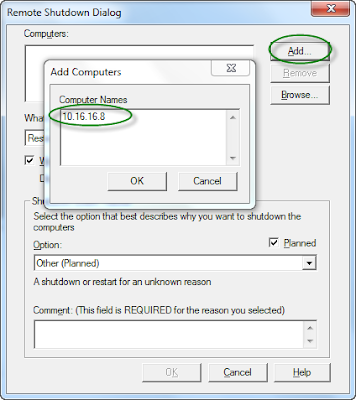
You will See A window Like This.


Click On Add and Type Computer Name Or Ip Address In the Computer name Dialouge Box.

Note: Write The IP address of Computers Which We found Live in Scanning With Angry Ip Scanner.

Now After That You have to Select "Shutdown" Options From The list.

Uncheck The "warn Users Of the action"

Lastly You have to write Something In the Comment Field.
Don't leave Comment Field Empty it will Note work If You do so.

9 Jun 2012

Run Commands


-----------------------------------------------------------
START >> RUN

Accessibility Controls                                   
access.cpl

Add Hardware Wizard
hdwwiz.cpl

Add/Remove Programs
appwiz.cpl

Administrative Tools
control.exe admintools

Automatic Updates
wuaucpl.cpl

Bluetooth Transfer Wizard
fsquirt

Calculator
calc

Certificate Manager
certmgr.msc

Character Map
charmap

Check Disk Utility
chkdsk

Clipboard Viewer
clipbrd

Command Prompt
cmd

Component Services
dcomcnfg

Computer Management
compmgmt.msc

Date and Time Properties
timedate.cpl

DDE Shares
ddeshare

Device Manager
devmgmt.msc

Direct X Control Panel (if installed)
directx.cpl

Direct X Troubleshooter
dxdiag

Disk Cleanup Utility
cleanmgr

Disk Defragment
dfrg.msc

Disk Management
diskmgmt.msc

Disk Partition Manager
diskpart

Display Properties
control.exe desktop

Display Properties
desk.cpl

Display Properties (w/Appearance Tab Preselected)
control.exe color

Dr. Watson System Troubleshooting Utility
drwtsn32

Driver Verifier Utility
verifier

Event Viewer
eventvwr.msc

File Signature Verification Tool
sigverif

Findfast
findfast.cpl

Folders Properties
control.exe folders

Fonts
control.exe fonts

Fonts Folder
fonts

Free Cell Card Game
freecell

Game Controllers
joy.cpl

Group Policy Editor (XP Prof)
gpedit.msc

Hearts Card Game
mshearts

Iexpress Wizard
iexpress

Indexing Service
ciadv.msc

Internet Properties
inetcpl.cpl

Java Control Panel (if installed)
jpicpl32.cpl

Java Control Panel (if installed)
javaws

Keyboard Properties
control.exe keyboard

Local Security Settings
secpol.msc

Local Users and Groups
lusrmgr.msc

Logs You Out Of Windows
logoff

Microsoft Chat
winchat

Minesweeper Game
winmine

Mouse Properties
control.exe mouse

Mouse Properties
main.cpl

Network Connections
control.exe netconnections

Network Connections
ncpa.cpl

Network Setup Wizard
netsetup.cpl

Nview Desktop Manager (if installed)
nvtuicpl.cpl

Object Packager
packager

ODBC Data Source Administrator
odbccp32.cpl

On Screen Keyboard
osk

Opens AC3 Filter (if installed)
ac3filter.cpl

Password Properties
password.cpl

Performance Monitor
perfmon.msc

Performance Monitor
perfmon

Phone and Modem Options
telephon.cpl

Power Configuration
powercfg.cpl

Printers and Faxes
control.exe printers

Printers Folder
printers

Private Character Editor
eudcedit

Quicktime (If Installed)
QuickTime.cpl

Regional Settings
intl.cpl

Registry Editor
regedit

Registry Editor
regedit32

Removable Storage
ntmsmgr.msc

Removable Storage Operator Requests
ntmsoprq.msc

Resultant Set of Policy
rsop.msc

Resultant Set of Policy (XP Prof)
rsop.msc

Scanners and Cameras
sticpl.cpl

Scheduled Tasks
control.exe schedtasks

Security Center
wscui.cpl

Services
services.msc

Shared Folders
fsmgmt.msc

Shuts Down Windows
shutdown

Sounds and Audio
mmsys.cpl

Spider Solitare Card Game
spider

SQL Client Configuration
cliconfg

System Configuration Editor
sysedit

System Configuration Utility
msconfig

System File Checker Utility
sfc

System Properties
sysdm.cpl

Task Manager
taskmgr

Telnet Client
telnet

User Account Management
nusrmgr.cpl

Utility Manager
utilman

Windows Firewall
firewall.cpl

Windows Magnifier
magnify

Windows Management Infrastructure
wmimgmt.msc

Windows System Security Tool
syskey

Windows Update Launches
wupdmgr

Windows XP Tour Wizard
tourstart

Wordpad
write

Try them out..

5 Jun 2012

Talking Tom Cat For PC Browser


Talking Tom Cat
Hi fiends, most of you know abuot Talking Tom Cat App which is available for IPhone And Android. But this time, I am sharing a flash swf file of Talking Tom Cat with you to run in pc browser. Remember, It's only a grabbed swf file, so it doesn't support voice commands. But you can click on it's body parts and see some funny actions. So download it now from the link below and enjoy...!!