Showing posts with label google. Show all posts

30 Jun 2013

Check How much Of Worth your Site $$$


Today i(abhi) telling about how to check the worth, value and see your blog traffic statistics.  The Worth in dollars. With amazing tools that can be used personally.

You might have seen the audience and traffics static bar in blogger dashboard though which you can see the visitors and your blog statistics but i will suggest you that is limited and have no such professional tools which helps us to see our blog alexa rank, domain age, your blog amount, server of the website, hosting data, location your site and many mores. I have tested many online tools that show the  full  information about your blog but be careful most of them are fake and generate fake result while entering your domain name.you can also check in search engine by writing this simple line "How to check website worth" then you will see alot of websites but all they are not real.So today i will share with you real website thats will give you full information about your blog or website lets see how does it work.

                Top 5 online tools to check your website worthSmile

Now you can see the links of these website mentioned below. Now how to check your site just open one site and enter your domain name like this www.alltechvillas.com then it will show all the history about your blog in a second. .

1: www.statscrop.com

             2: www.worthofweb.com

                       3: www.yourwebsitevalue.com

                               4: www.webstatsdomain.com

                                            5: www.woorank.com

29 Jun 2013

TAKEOUT Your Google Data BackUp..in to zip

While we're waiting for Google to sort out the mess over suspended Google+ accounts, it's a good reminder that you have the option to download much of your Google+ data with Google Takeout. Google Takeout, created by an internal Google engineering team marketed as the Data Liberation Front, is a free service that provides a handy and easy way to download data from your Google+ stream, your contacts and circles, and other information in a zip file.
I've seen some anecdotes that indicate that if your Google+ account is suspended, it may affect your ability to use other Google account services, including Google Reader, Buzz, and Google Takeout itself. If you have an unusual name, or are worried that Google might suspend your account, I recommend that you make regular backups of your data in case of suspension (though, if your Google+ account does get suspended, there are steps you can take to get it reinstated).

Step 1 Log in to Google Takeout

Go to http://www.google.com/takeout. Log in with your Google Account email and password.
How to Download Your Data with Google Takeout

Step 2 Choose the Data You Want to Download

You can select everything or choose which services you want to download from. Google Takeout does not currently let you download all the data from Google Account services, but you can manually do so with the instructions on the Data Liberation pages on other Google products.
How to Download Your Data with Google Takeout

Step 3 Click on "Create Archive"

If you've created a previous download, it'll show that one on the bottom. In my experience, the downloads have been pretty quick - less than a few minutes for any download.
How to Download Your Data with Google Takeout

Step 4 Click "Download" and Save File

Make sure you save it to a folder on your computer where you can easily access the file.
How to Download Your Data with Google Takeout

Step 5 Check Out Your Data

Each product has its own folder.
How to Download Your Data with Google Takeout

Step 6 Repeat Regularly

Currently there isn't any way to schedule these backups via Google Takeout, but I think it's a good idea to back up your data regularly anyway. Especially if you have an uncommon name. You never know when/if your Google+ account could get flagged.

28 Jun 2013

Google glass: A New Technology

Google Glass: what you need to knowDoes Project Glass represent the next big step in mobile communications?

Related stories

Back in early 2012, before the world had heard of Google Glass, the tech world was ablaze with rumours that the search giant was beavering away on augmented reality goggles.

As the days went by, it was clear that not only was this true, but that Google's dream of wearable technology was far, far closer to release than anyone would have guessed.

Roll forward just over a year and the first versions are in the hands of developers who went into a lottery to fork out $1,500 for their own pair of spectacles.

But what exactly is Google Glass? Why is it attracting all this attention and what are the implications - both good and bad - of having a Google-eye view of the world?

Google Glass: what you need to knowGoogle Glass and its prism display

What is Google Glass?

Google Glass is an attempt to free data from desktop computers and portable devices like phones and tablets, and place it right in front of your eyes.

Essentially, Google Glass is a camera, display, touchpad, battery and microphone built into spectacle frames so that you can perch a display in your field of vision, film, take pictures, search and translate on the go.

The principle is one that has been around for years in science fiction, and more recently it's become a slightly clunky reality. In fact, the "heads-up display" putting data in your field of vision became a reality as early as 1900 when the reflector sight was invented.

Google Glass: what you need to knowGoogle Glass options

Google Glass uses display technology instead to put data in front (or at least, to the upper right) of your vision courtesy of a prism screen. This is designed to be easily seen without obstructing your view. According to Google the display is "the equivalent of a 25-inch high definition screen from eight feet away". There's no official word on native resolution, but 640 x 360 has been widely mooted.

Overlaying data into your vision has obvious benefits; many of which are already functional in Google Glass. Directions become more intuitive (although it sounds like there is no GPS on board so you will have to pair it with your phone), you can view real-time translations or transcriptions of what is being said, and you can scroll through and reply to messages - all on the fly.

Google Glass: what you need to knowGoogle Glass - certainly capturing plenty of attention

The embedded camera obviously does not need a viewfinder because it is simply recording your first-person perspective, allowing you to take snaps or footage of what you are actually seeing.

Any function that requires you to look at a screen could be put in front of you.

Controlling this data is the next neat trick. With a microphone and touchpad on one arm of the frame, you can select what you want to do with a brief gesture or by talking to the device, and Google Glass will interpret your commands.

Google Glass can also provide sound, with bone-induction technology confirmed. This vibrates your skull to create sound, which is both more grisly sounding and much less cumbersome than traditional headphones.

What can Google Glass do?

As well as Google's own list of features, the early apps for Google Glass provide a neat glimpse into the potential of the headset.

As well as photos and film - which require no explanation - you can use the Google hangout software to video conference with your friends and show them what you're looking at.

You'll also be able to use Google Maps to get directions, although with GPS absent from the spec list, you'll need to tether Glass to your phone.

"Is Glass cool and entirely novel? Yes, it certainly is. Is it a device that will change the life of, or even just prove useful to, the average consumer? That's doubtful."

To do that, Google offers the MyGlass app. This pairs your headset with an Android phone. As well as sharing GPS data, this means messages can be received, viewed on the display, and answered using the microphone and Google's voice-to-text functionality.

Google has given its Glass project a big boost by snapping up voice specialists DNNresearch.

That functionality will also bring the ability to translate the words being spoken to you into your own language on the display. Obviously you'll need a WiFi connection or a hefty data plan if you're in another country, but it's certainly a neat trick if it works.

Third parties are also already developing some rather cool/scary apps for Google Glass - including one that allows you to identify your friends in a crowd, and another that allows you to dictate an email.

The New York Times app gives an idea how news will be displayed when it's asked for: a headline, byline, appropriate image and number of hours since the article was published are displayed.

Google Glass: what you need to knowGoogle Glass - another reason not to miss your flight

Other cool ideas include a air carrier's suggestion that you could haveflight flight details beamed to you while you are waiting at the airport. Basically, the sky's the limit.

If you want to know if Google Glass is any good - TechRadar's Alex Roth spent time with the device and said the following:

"Is Glass cool and entirely novel? Yes, it certainly is. Is it a device that will change the life of, or even just prove useful to, the average consumer? That's doubtful."

What are the Google Glass specifications?

As well as a mooted 640 x 360 display, the built-in camera is a 5MP snapper that can film at 720p.

Battery life is apparently a day, although that's with the usual "typical use" caveat, which probably excludes a lot of videoing.

There's 16GB of flash memory built into the device, although only 12GB will be available for user storage. The device will sync to your Google Drive in the cloud

Bluetooth and WiFi will be built in, but no GPS chip - so the Glass will probably work best alongside an Android phone, although you can pair with any Bluetooth enabled phone.

The frame will come with replacement and adjustable nosepads, and is expected to be both lightweight and extremely robust. It will also have atouchpad along one arm.

The sound will be produced through bone conduction transfer - vibrating your skull to transmit to your ears.

There is a Micro USB cable and charger for the dev versions, and all of the above specs are expected to be replicated in the consumer versions when they arrive.

Lastly, Google Glass will come in five colours: Charcoal, Tangerine, Shale, Cotton and Sky. Using Glass's translation ability to turn that list from marketing speak to plain English, that's black, orange, grey, white and blue.

Google Glass: what you need to knowGoogle Glass will come in five colours

What's the Google Glass price?

The Google Glass Explorer (the developer version being sent out now)costs $1,500 - around £985 or AU$1,449.

The consumer versions, which are expected to arrive by the end of 2013, are expected to be a little cheaper, although any actual prices remain speculative. They are unlikely to be super-cheap - but Google's success with the Nexus 7 tablet may prompt the company to subsidise some of the cost.

Google Glass: what you need to knowGoogle Glass - coming to a developer near you (if you live in the US)

When is the Google Glass release date?

A final release date has not been announced, but sources tell us that theoriginal suggestion of 2014 was actually overly pessimistic and we could see Google Glass arrive in time for the end of 2013. So start readying your letter to Santa.

Google Glass: what you need to knowGoogle Glass - robust enough?

I already wear glasses. Will Google Glasses work for me?

Yes - Google is already working on designer versions which will include prescription lenses.

Google Glass: what you need to knowGoogle Glass with glasses

Who is providing the competition?

Of course, with something as high profile as Google Glass, every major company has been linked with building a competitor.

Apple and Microsoft are Google's most obvious rivals - and both are rumoured to be working on their own equivalents. Sony has gone so far as to patent a Glass-alike offering. Vuzix, Oakley and Baidu are other numbered among the potential Glass rivals, and they won't be the last. Indeed, one Taiwanese manufacturer Oculon are readying a cheaper, higher spec'ed (ahem) version.

Google Glass: what you need to knowThere is going to be plenty of competition going forward

Interestingly, Google might already be considering its own successor to Glass if this patent is to be believed. The patented design looks more like regular glasses, following the style of Google's potential competitors.

Is Project Glass evil?

Obviously with any new technology there is the potential for misuse - and Google Glass is, of course, a little problematic when it comes to privacy.

Of course, Google would say that it is merely taking the functionality that we already have in our portable devices and making it more readily accessible.

Google Glass: what you need to knowGoogle Glass - is it evil?

A lot will come down to personal preference. For many, the prospect of being filmed by someone from their glasses will make them uneasy, having conversations logged and transcribed will be divisive, and the inclusion of facial recognition would clearly be problematic.

5 Jun 2012

Send Free SMS To Anyone Using Gmail


send free sms via gmail
Google has recently introduced it's new feature, GMail SMS Messaging which is available in so many countries including some asian countries. Using this feature, you can send smss to anyone in any country free of cost.
So if you have zero balance in your mobile and still you want to reply your friends who are messaging you, you have the right option of gmail's sms feature.


Steps To Send SMS Using Gmail:
1. Login to your gmail account and add a new contact of the person you want to send sms to. If you have already that person in the contact list, you can skip this step.
send free sms via gmail
2. Now after adding the new contact, you can see the new contact in your contact list. Now you will have to add the mobile number of that person in his/her contact details. To add the mobile number, click on the Name to edit the details.
send free sms via gmail
3. After clicking the name, a form will appear as shown in the image, you will have to fill the mobile number there and save that.
send free sms via gmail
4. Now, once again go to your contact list and as you hover your mouse pointer on the name of the person, you will see a window as shown in the image. Just clikc on MORE and then click SEND SMS.
send free sms via gmail
5. As you click on Send SMS, you will see the chat box in the right bottom corner of the screen. From there, you can type your sms and can send to your friend free of cost. So, enjoy this service.
send free sms via gmail
Note: You will be given 50 free sms credits. Your one credit is deducted after sending each sms, but if you receive the reply from the person you are sending messages, you will get 5 more credits. So tell your friend to reply to your messages. Standard sms charges will be applied for the person who is replying to the messages.
See the full list of supported countries and operators here.

angry birds space theme
I have provided Angry Birds Space Full Versions For Different Platforms in my previous posts. This game is the most popular game on the net. So, I hope you also enjoyed the game. If you want to give your whole pc a look ofAngry Birds Space, then I have Angry Birds Space Theme for windows 7 and windows 8. After installing it, you will be able to give your pc a cool look of Angry Birds Space. So, download it now and make your pc angry... And don't forget to share with your friends also.
Enjoy.

11 May 2012

Wndows 8


Windows 8 Consumer preview Hits 1 Million Downloads


Microsoft's Windows 8 Consumer Preview saw more than one million downloads during the first day of its release, the Building Windows 8 team said via Twitter late Thursday. The beta version of Windows 8 posted on Wednesday morning; it's not clear whether the first million downloads occurred within or just beyond the first 24 hours of availability. Microsoft recorded three million downloads of the Windows 8 Developer Preview between September and December, 2011. 

The latest version of Windows is a dramatic departure from previous versions of Microsoft's trademark OS. Most notably, the decades old PC desktop has been kicked from its perch as the main Windows interface in favor of a touch-centric Start screen that echoes Windows Phone 7. "Windows 8 reimagines Windows, from the chipset to the experience," said Steven Sinofsky, president of Microsoft's Windows division.

Expectations are high that Windows 8 (also designed for ARM SoCs) will enable tablet manufacturers to mount a serious challenge to Apple's iPad, which Android tablets have so far failed to do. Whether Windows 8 will be a big winner on traditional PCs, however, is unclear. Microsoft says Windows 8 is just as easy to use with a mouse as it is with a touchscreen, but it requires users to learn a new way of navigating a Windows PC.  

The start button is replaced with a hot corner that kicks you back to the new Metro-style touch-friendly Start screen. From there you can choose to open traditional desktop apps or use some of the new Metro apps such as Xbox LIVE Games, Maps, and a Metro-style Internet Explorer.


PC users will also have to be content with full-screen programs when using Metro-style apps, and must learn how to use the new Charms Bar on the far right of the Windows 8 display. The Charms Bar includes important system functions such as Settings, Search, settings for devices connected to your computer, and a new social-networking friendly Share button. 
Windows 8 does offer some new features for PC desktop users, including a revamped file transfer dialog box, tools to deal with duplicate files, faster boot times, and new SkyDrive integration with Windows Explorer (not yet available in the Consumer Preview).

But the main focus for Microsoft in Windows 8 is the touch experience, while the desktop has been turned into a second-class citizen. That appears to be Microsoft's plan for the moment, anyway.  The reaction of regular PC users to Windows 8's radical departure is unclear. 
Nevertheless, the large numbers of Windows 8 Consumer Preview downloads suggests, at the very least, that users are interested in checking out the newest version of Windows.

Download your free copy here

30 Jan 2012

How To Send Mails In Future In GMAIL

Some times it becomes necessary you to send mails in future for your friends,colleagues etc.Here I got a simple Trick using by which you can send mails in future via gmail keep reading.
Schedule+emails+for+future+via+gmail

How to Send Mails in Future via Gmail:

1.First download this Application Boomerang[link].
This Application is available for different browsers(Google Chrome, Mozilla Forefox,Safari etc).
2.Download this Application and install it for your respective browser.
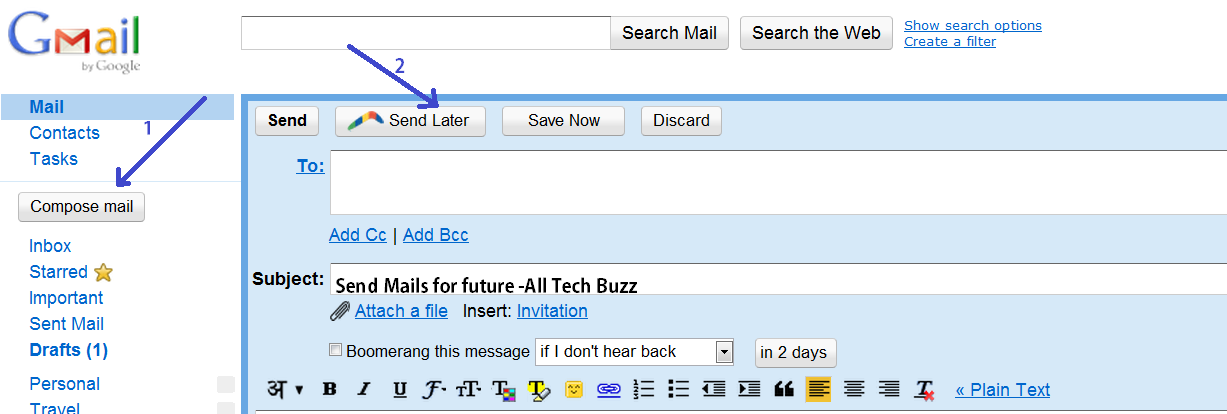
3.Now log in to your Gmail and go to Compose Mail.
compose+email+to+send+for+future
4.Now Click the button Send Later and there you can Schedule Time at what time you want to send mail.Then click confirm.
5.If you want to reschedule or make any changes the you can go to Boomerang and go to Manage Scheduled Mails
Rescheduling+mail+via+Boomerang

6.In Manage Scheduled Mails you can reschedule,Send instantly or Delete mail.

reschedule+mails+from+boomerang
7.That's it friends ,you are done. 
Hope you liked the Trick to schedule mails in future.For more Tips and Tricks keep visiting.