30 Jan 2012

How To Send Mails In Future In GMAIL

Some times it becomes necessary you to send mails in future for your friends,colleagues etc.Here I got a simple Trick using by which you can send mails in future via gmail keep reading.

Schedule+emails+for+future+via+gmail

How to Send Mails in Future via Gmail:

1.First download this Application Boomerang[link].
This Application is available for different browsers(Google Chrome, Mozilla Forefox,Safari etc).
2.Download this Application and install it for your respective browser.
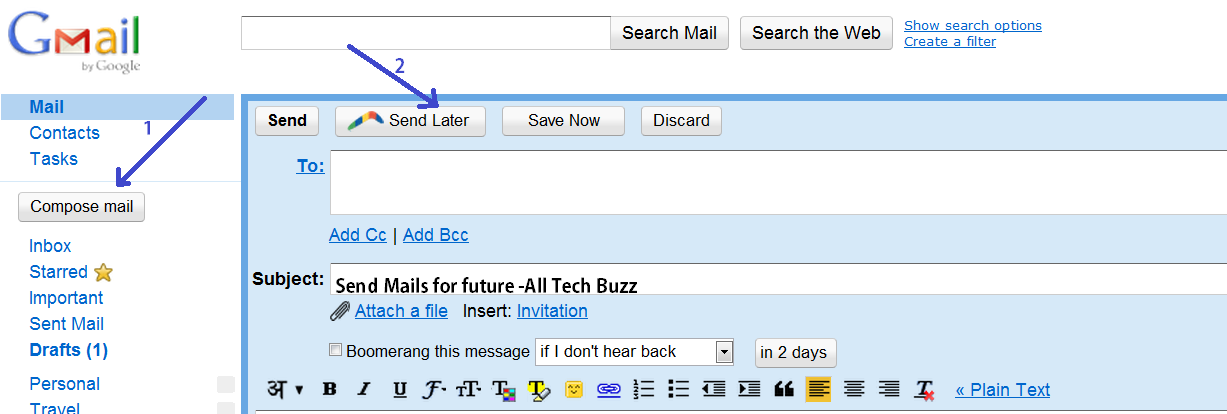
3.Now log in to your Gmail and go to Compose Mail.
compose+email+to+send+for+future
4.Now Click the button Send Later and there you can Schedule Time at what time you want to send mail.Then click confirm.
5.If you want to reschedule or make any changes the you can go to Boomerang and go to Manage Scheduled Mails
Rescheduling+mail+via+Boomerang

6.In Manage Scheduled Mails you can reschedule,Send instantly or Delete mail.

reschedule+mails+from+boomerang
7.That's it friends ,you are done. 
Hope you liked the Trick to schedule mails in future.For more Tips and Tricks keep visiting.
28 Jan 2012

Automatically Update Windows Drivers With Driver Reviver


Drivers are the main brain plants for any software, if there are no drivers installed than chances are that software might not work or give you some errors while working, drivers updating is really necessary as it brings more features and interactivity for that software. Now manual updation is really not possible as you have to find all the drivers and than download + install them, but sometimes you might not find the correct driver for your device, so here comes the role of Driver Reviver the best Driver Updater Software.
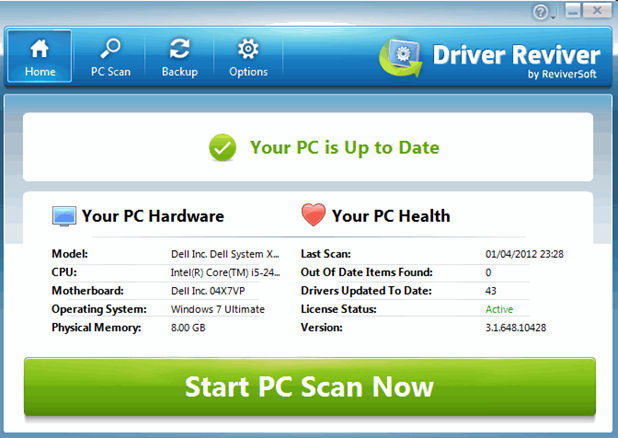
Driver Reviver simply scans your PC for outdated drivers and than automatically download and install the updated driver in your system, you simply have give it command and it does every thing automatically.
Driver Reviver


So download Driver reviver software from below and give it a try and see how it automatically scans - downloads - installs drivers on your Windows Machine. Even Top Ten Reviews gives Driver Reviver the first place in Driver Updater Software category. So grab it now from below and have fun.

27 Jan 2012

TRICK TO CREATE KEYBOARD SHORTCUT FOR ANY PROGRAM


Shortcuts are a fast and a simple method to launch applications.Like for opening task manager we useCtrl+Shift+Esc.Everyone has different set of programs that they use frequently.By using this trick you can create a custom shortcut for any program.We don’t need any third party software to create these shortcuts.You can use this trick in Windows Xp,Vista and Windows 7.

Now I will show you how you can create a Custom Shortcut for Adobe Photoshop and by using the same process you can create custom shortcut for any program.


  • Click on Start button and type the name of the program (In our case itsphotoshop)
  • Now right click on the program and click on Properties

  • In the Shortcut Key field type any key that you want to use as shortcut.(I will use P for photoshop)
  • Now  your custom shortcut for this program will be Ctrl+Alt+Key (So my shortcut is Ctrl+Alt+for photoshop)


  • Press Ok button to save these changes and then close the dialog box.
  • Now you can use the custom shortcut to launch  the program.
You can create as many shortcuts for as many programs as you want.
</

How To Convert 1GB Memory Card to 2GB in Size


Friends today I am here with an Interesting post  how you can convert your 1gb memory card to 2gb.It becomes unbelievable when you here something like this  but,now you try this trick yourself and see how it works.You can convert a 1GB memory card to 2 GB with the help of free software.
Note: This trick only works on 1GB memory card.

 Friends here are the steps to make this trick work:

1. First empty your memory card and store data in other media or on your computer.
2. Download Skymedi-2GB-Fix-Software from below given link.
      Download: Skymedi-2GB-Fix-Software
3. Right click on file 1GB_to_2GB.exe and select “Run as Administrator“.
4. Select the drive from the drop down menu you want to fix.
5. In picture below you can see that software in showing the memory card space which is 955 MB.

6. Simply click on Fix button to start the conversion process and click Yes button.
7. Congratulations you have successfully converted a 1Gb memory card to 2 GB.

PLAY YOUTUBE VIDEOS DIRECTLY ON VLC MEDIA PLAYER


Step 2: Go to YouTube.com and copy its URL without the parameters.


Step 3: Goto your VLC media player > Media > Open Network Stream.


Step 4: Paste the URL in there click Play. :|


Video of  "Play Youtube Videos Directly On VLC media Player"
<

22 Jan 2012

Ultra Video Converter Full


Thiis a powerful video tool to convert all popular video formats to AVI, MPEG, VCD, DVD, WMV, ASF, MP4 , 3GP formats.
It can support almost all video formats including AVI, DivX , XviD, MPEG, DAT, WMV, ASF, RM, 
RMVB, MOV, QT , MP4, M4V, 3GP, FLV, MKV.
thIntegrated High-speed MPEG encoder which let you make DVD-Video files(VIDEO_TS, AUDIO_TS) and VCD/SVCD image(*.bin,*.cue), so you can burn VCD/SVCD/DVD disc easily by using third-party buring tools.


The main features include: adjust output video quality, adjust 4:3 or 16:9 video aspect, add subtitle onto the output video, all encoders/codec are built-in and any supported conversion can be done once you downloading the software Fast conversion speeds and high quality , simple GUI and very EASY to use.Key Features

Video source supports AVI, DivX, XviD, MPEG, DAT, WMV, ASF, RM, RMVB, MOV, QT ,MP4, M4V, 3GP, FLV, MKV etc.Supports all video files to AVI, DivX, XvidSupports all video files to MPEG1, MPEG2Supports all video files to VCD,SVCD,DVD compatible MPEG formats
Supports all video files to VCD SVCD image(*.BIN,*.CUE) and DVD-Video files(*.IFO,*.VOB,*.BU
Supports all video files to WMV, ASF
Supports all video files to MP4, 3GP
All encoders/codec are built-in and any supported conversion can be done once you downloading the software
Batch files conversion
Output size adjustment, output quality adjustment
Cut unwanted parts by specifying start time and end time
NTSC/PAL setting options for DVD, VCD, SVCD exporting
Support "Drag and Drop" from Windows Explorer
Custom define the output audio volume.
Add letterbox to keep the original aspect ratio
Support large video file, even large then 2GB
Fast conversion speeds and high quality
Simple GUI and very EASY to use
Lifetime FREE Technical Support and FREE upgrade . Free trial download.30 day money back guarantee 
System Requirements
Windows 98/ME/2000/XP/Vista/7 operating system
Pentium 300 MHz or better
128M or more RAM
About 50Mb free hard drive space 

DOWNLOAD