8 Jul 2012

UCWeb Browser V8.2.3 For android


Hi friends, UCWeb Browser has been awarded as the best browser of the world because of it's amazing features and fastest speed. So I'm providing it's latest version so that you can also enjoy it's cool features and high speed on your android phone.

uc browser for android
The features of this browser are:
1. Multi Touch Feature : Now UC Browser 8.2.3 comes with a multi touch features which allows you to go back and forward, closing and opening just by using your fingers.
2. VOX (Voice Control) : Now UC Browser comes with the voice recognition support which allows you to speak the website name and you are on that website no need for your fingers.
3. Cloud Acceleration : UC Browser's cloudR acceleration technology makes it fast to render webpages giving you optimum speeds and acceleration.
4. RSS Reader : Its RSS Reader allows you too bookmark and visit your favorite websites easily.
5. Auto Focusing : Main content is automatically focused hiding all the ads and other crappy stuff. Just a click at the place and things done.

Windows Xp Registry tricks


Its a mixed bag.. a compilation of all the tricks..

many tricks are what i discovered..
many are shared ..
keep posting if u know more

  •  Display Your Quick Launch ToolbarTip:
Is your Quick Launch toolbar missing from the taskbar?
To display your familiar Quick Launch toolbar:
Right-click an empty area on the taskbar, click Toolbars, and then click Quick Launch. 

Easy as that your Quick Launch bar appears. To add items to your Quick Launch toolbar, click the icon for the program you want to add, and drag it to the Quick Launch portion of the taskbar. 


---------------------------------------------------------------------------------------------------------------------------------------------------------------------

  • How to stop new prHow to remove recycle bin from your desktop Tip:

Open Regedit by going to START - RUN and type Regedit and hit enter. Then you should navigate to following entry in registry HKEY_LOCAL_MACHINE\SOFTWARE\Microsoft\Windows\CurrentVersion\Explorer\
Desktop\NameSpace\{645FF040-5081-101B-9F08-00AA002F954E} and delete it. This action should remove recycle bin from your desktop.

---------------------------------------------------------------------------------------------------------------------------------------------------------------------  

  • pograms installed balloon from coming up tip:

Right click on START button and select properties. Click on Customize and go to Advanced tab and deselect check box saying "Highlight newly installed programs". This would help you stop this annoying feature from popping up every now and then.


-------------------------------------------------------------------------------- ----------------------------------------------------------------------------- ------
  • Unlock Toolbars to Customize Them Tip:

The new Windows XP now features locking toolbars, and you can adjust them. You may customize a lot of the Windows XP features such as the Taskbar, Start Menu, and even toolbar icons in Internet Explorer and Outlook Express. Remember your right-click:
* Right-click on a toolbar, and then click Lock the Toolbars to remove the check mark.
* Right-click on the toolbar again, and then click Customize.

You may add or remove toolbar buttons, change text options and icon options. When you've got the toolbar customized, click Close. Now right-click on the toolbar and then click Lock the Toolbars to lock them in place. com


-------------------------------------------------------------------------------- -- ----------------------------------------------------------------------------- --

  • Want to remove shared documents folder from My Computer window tip:

Some don't like my shared documents folder option. If you are one of that, here is a trick to remove it.Open registry editor by going to START-RUN and entering regedit.
Once in registry, navigate to key HKEY_LOCAL_MACHINE \ SOFTWARE \ Microsoft \ Windows \ CurrentVersion \ Explorer \ My Computer \ NameSpace \ DelegateFolders You must see a sub-key named {59031a47-3f72-44a7-89c5-5595fe6b30ee}. If you delete this key, you have effectively removed the my shared documents folder.

-------------------------------------------------------------------------------- -- ----------------------------------------------------------------------------- --

  • How to improve on shutdown time ? Close apps automatically & quickly at shutdown tip:

Open Registry by going to START-RUN and typing REGEDIT. Navigate to HKEY_CURRENT_USER\CONTROL PANEL\DESKTOP and look for AutoEndTasks. On my computer default value is 0. Change it to 1. Thats all. Further more you can reduce the time it takes for Windows to issue kill directive to all active/hung applications.
In doing this only constraint that you should make sure exists is that HungAppTimeout is greater than WaitToKillAppTimeout. Change the values of WaitToKillAppTimeout to say 3500 (since default value for HungAppTimeout 5000 and for WaitToKillAppTimeout is 20000)


-------------------------------------------------------------------------------- -- -----------------------------------------------------------------------------
  • Are you missing icons Tip:


Are you missing icons? You may be wondering where all the icons from your desktop are in Windows XP? Well if you're like me, you like to have at least My Computer, My Network Places, and My Documents on the your desktop.
You need to:
* Right-click on the desktop, and then click Properties.
* Click the Desktop tab and then click on Customize Desktop.
* Put a check mark in the box next to My Document, My Computer, My Network Places, or Internet Explorer, to add those familiar icons to your desktop. Easy yes!

-------------------------------------------------------------------------------- -- -----------------------------------------------------------------------------

  • How to login as administrator if you don't see it available tip:

Unless and until you have run into issues and fixing XP (underwhich case you have to go to Safe Mode to login as Administrator), you can get to administrator screen by simply pressing CTRL+ALT+DELETE twice at the main screen.

--------------------------------------------------------------------------------- ----------------------------------------------------------------------------- ----

  • Speedup boot up sequence by defragmenting all key boot files tip:

Open Registry by going to START-RUN and typing REGEDIT. Navigate to HKEY_LOCAL_MACHINE\SOFTWARE\Microsoft\Dfrg\BootOptimizeFunction. In right hand panel look for Enable. Right click on it and set it 'Y' for enable. This is the way I have it set on my computer. This will help speedup boot time.


Use a Shortcut to Local Area Network Connection Information:


-------------------------------------------------------------------------------- -- ----------------------------------------------------------------------------- --

  • Use a Shortcut to Local Area Network Connection Information Tip:


Here's something new in Windows XP, instead of using the command line program and typing ipconfig to get local area network information, you can try using the following shortcut:
* Click on Start, point to Connect to, and then click Show All Connections.
* Right–click the connection you want information about, and then click Status.
* In the connection Properties dialog box, click the Support tab.
* For more information, click on the Advanced tab.

To automatically enable the status monitor each time the connection is active, in the connection Properties dialog box, select the Show icon in taskbar notification area when connected check box.

-------------------------------------------------------------------------------- -- ----------------------------------------------------------------------------- ---

  • Do you know you can have Virtual Desktops (like in Linux) with PowerToys ?

If you have powertoys installed on Windows XP Its available for free at Microsoft download webpage. It is very easy to enable Microsoft Virtual Desktop Feature. Simply right click on the Start Panel Bar also called TaskBar, Click on Tool Bar and select Desktop manager.
You would see a set of 5 icons placed on the right portion of the TAskBar. Click on number 1 to 4 to go to any of the desktops. Now you have have four different Active Desktops.
IMPORTANT NOTE: You may see a little degradation in performance.

-------------------------------------------------------------------------------- -- ----------------------------------------------------------------------------- --

  • Customize Internet. Explorer Title bar tip:

This tip won't make your computer any faster but may help personalize your computer experience. Open Registry by going to START-RUN and typing REGEDIT. Navigate to HKEY_CURRENT_USER\Software\Microsoft\Internet. Explorer\Main. In right hand panel look for string "Window Title" and change its value to whatever custom text you want to see.


7 Jul 2012

Top 10 Free Video Rippers, Encoders, and Converters


Top 10 Free Video Rippers, Encoders, and Converters

10. VLC media player (Open source/All platforms)

Top 10 Free Video Rippers, Encoders, and Converters Ok, so VLC is a media player, not converter, but if you're watching digital video, it's a must-have—plus VLC can indeed rip DVD's, as well as play ripped discs in ISO format (no actual optical media required.) VLC can also play FLV files downloaded from YouTube et al, no conversion to AVI required. Since there's a portable version, VLC's a nice choice for getting your DVD rips/saved YouTube video watching on wherever you go.

9. MediaCoder (Open source/Windows)

Batch convert audio and video compression formats with the open source Media Coder for Windows, which works with a long laundry lists of formats, including MP3, Ogg Vorbis, AAC, AAC+, AAC+V2, MusePack, WMA, RealAudio, AVI, MPEG/VOB, Matroska, MP4, RealMedia, ASF/WMV, Quicktime, and OGM, to name a few.

8. Avi2Dvd (Freeware/Windows)

Top 10 Free Video Rippers, Encoders, and ConvertersMake your video files burnable to a DVD with Avi2Dvd, a utility that converts Avi/Ogm/Mkv/Wmv/Dvd files to Dvd/Svcd/Vcd format. Avi2Dvd can also produce DVD menus with chapter, audio, and subtitle buttons.

7. Videora Converter (Freeware/Windows only)

Top 10 Free Video Rippers, Encoders, and Converters Videora Converter is a set of programs, each designed to convert regular PC video files into a format tailored to your favorite video-playing handheld device. The Videora program list includes iPod Video Converter (for 5th gen iPods), iPod classic Video Converter (for 6th gen classic iPods), iPod nano Video Converter (for 3rd gen iPod nanos), iPod touch Video Converter, iPhone Video Converter, Videora Apple TV Converter, PSP Video 9, Videora Xbox360 Converter, Videora TiVo Converter, and Videora PMP Converter. Lifehacker alum Rick Broida used Videora in conjunction with DVD Decrypter to copy DVDs to his iPod.
Honorable Mention: Ares Tube for Windows converts YouTube and other online videos to iPod format.

6. Any Video Converter (Freeware/Windows only)

Top 10 Free Video Rippers, Encoders, and Converters Convert almost all video formats including DivX, XviD, MOV, rm, rmvb, MPEG, VOB, DVD, WMV, AVI to MPEG-4 movie format for iPod/PSP or other portable video device, MP4 player or smart phone with Any Video Converter, which also supports user-defined video file formats as the output. Batch process multiple files that AVC saves to a pre-selected directory folder, leaving the original files untouched.

5. Hey!Watch (webapp)

Web application Hey!Watch converts video located on your computer desktop as well as clips hosted on video sites. Upload your video to Hey!Watch to encode it into a wide variety of file formats, like H264, MP4, WMV, DivX, HD Video, Mobile 3GP/MP4, iPod, Archos and PSP. Hey!Watch only allows for 10MB of video uploads per month for free, and from there you pay for what you use, but it's got lots of neat features for video publishers like podcast feed generation and automatic batch processing with options you set once.

4. VidDownloader (webapp)

When you don't want to mess with installing software to grab that priceless YouTube clip before it gets yanked, head over to web site VidDownloader which sucks in videos from all the big streaming sites (YouTube, Google Video, iFilm, Blip.TV, DailyMotion, etc.), converts 'em for you to a playable format and offers them for download. Other downloaders for online video sites buy you a Flash FLV file, but VidDownloader spits back an AVI file.

3. iSquint (Freeware/Mac OS X only)


Convert any video file to iPod-sized versions and automatically add the results to your iTunes library. iSquint is free, but Lifehacker readers have praised the pay-for iSquint upgrade, VisualHub, which offers more advanced options for a $23 license fee. Check out the feature comparison chart between iSquint and VisualHub.

2. DVD Shrink (Freeware/Windows only)

Top 10 Free Video Rippers, Encoders, and Converters Copy a DVD to your hard drive and leave off all the extras like bonus footage, trailers and other extras to save space with DVD Shrink. Download Adam's one-click AutoHotkey/DVD Shrink utility to rip your DVDs to your hard drive for skip-free video play from scratchy optical media.
Honorable mention: DVD Decrypter (beware of advertisement interstitial page), which Windows peeps can use to copy DVDs to their iPods.

1. Handbrake (Open source/Windows, Mac)


Back up your DVD's to digital file with this open source DVD to MPEG-4 converter app. See also how to rip DVDs to your iPod with Handbrake.


What's your favorite way to convert video to the right format? Did we miss any good ones in this list? Let us know in the comments.

FLV to Any Format Video Converter Software Full Version Free Download


Click Below To Download The Software.
No Key Required, Its A Self Cracked Full Version
Size:: 5.25MB

Internet Download Manager Full version Trick


solution For--Internet Download Manager has been registered with a fake serial
https://blogger.googleusercontent.com/img/b/R29vZ2xl/AVvXsEjTgPwffBqsUixqbrp2l4KslDHAtb8zBqzunu2qF2BEFHsAfQ6kuE0qD-AQ-5Jc-fPavCBpIBQWUnO628amkmbKUn32B45wnOYa2bkSKvhz9or_k89WHKlJIu8L9AqkUpH46yq-qes8dPs/s1600/idm604b21.jpg
Internet Download Manager (IDM) is a tool to increase download speeds by up to 5 times, resume and schedule downloads. Comprehensive error recovery and resume capability willrestart broken or interrupted downloads due to lost connections, network problems, computer shutdowns, or unexpected power outages. Simple graphic user interface makes IDM user friendly and easy to use.Internet Download Manager has a smart download logic accelerator that features intelligent dynamic file segmentation and safe multipartdownloading technology to accelerate your downloads. Unlike other download managers and accelerators Internet Download Manager segments downloaded files dynamically during download process and reuses available connections without additional connect and login stages to achieve best acceleration performance.

I have been using IDM for last 2 years and it's really a nice download manager. People often get addicted to it and don't want to uninstall it at any cost. People who purchase a licence enjoy it working without any problem but those who use "fake key" (downloaded from torrent clients) suffer from the message "Internet Download Manager has beenregistered with a fake serial number or serial number has been blocked. IDM is now exiting.......".

The solution for this problem is not easily available and the only step the user left with is uninstalling the software completely. Even after several installation and uninstallation the problem exists unless you format your computer.If you want a permanent and exactsolution for this problem follow these steps:-


1. Exit IDM from the taskbar before entering the serial.

2. Disconnect active connections to the internet.

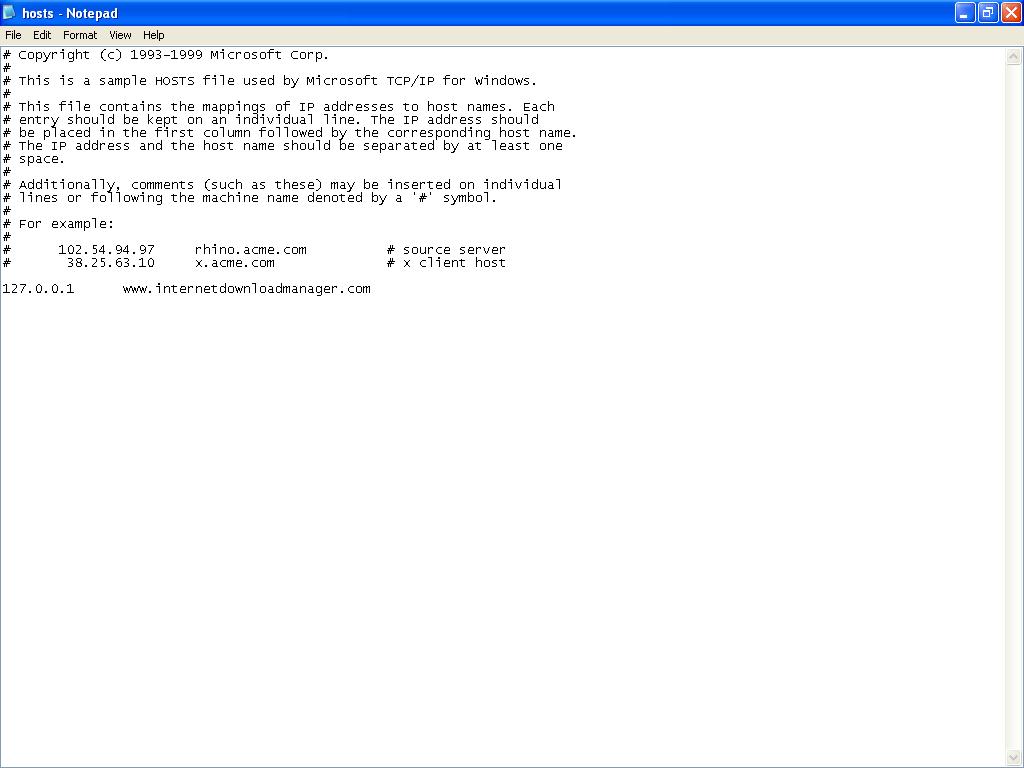
3. Then go to the directory C:\Windows\system32\drivers\etc and locate the file 'hosts'

4. Open the "hosts" file with "notepad".

5. on the last line enter the following address as shown and save.

127.0.0.1 www.internetdownloadmanager.com


6. Now, again enter the "fake serial" and wait for few seconds.

7. your IDM is registered again.

8. No wonder you would be facing this problem again but without panic use a "new fake key" ( this time steps 3,4 and 5 are not required, the only thing required is "a keygen" for generating a new key. For IDM 5.14 Dr.Carbon Keygen is used ).


Happy Downloading !!

Download VLC Media Player 2012


Click Here To Download